Manage Firewall at VPC Level
Overview
- This feature lets users monitor and manage the protection state of VPCs.
Procedure
Step 1. Select the Firewall Management tab in the menu. The system displays the VPC list.
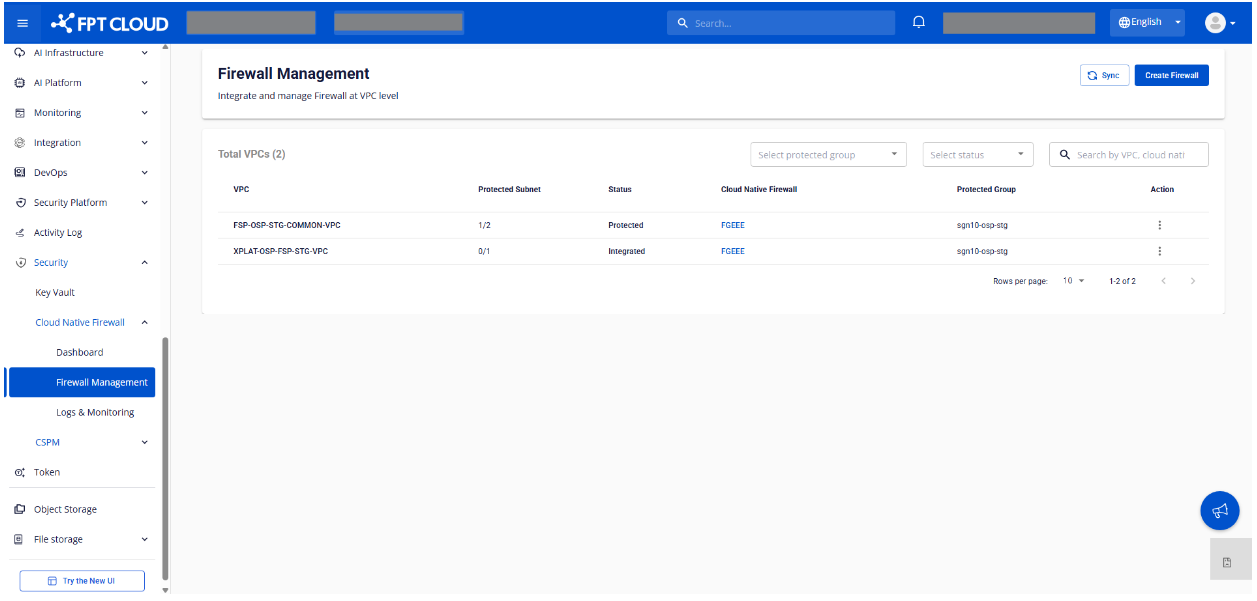
Step 2. Review the VPC list and Firewall integration info.
Displayed information
Each VPC row shows:
| Column | Description |
|---|---|
| VPC | VPC name |
| Protected Subnet | Number of protected subnets / total subnets |
| Status | Firewall integration status (see below) |
| Cloud Native Firewall | Firewall currently integrated with the VPC |
| Protected Group | Protection group (Site - Region) |
Status values:
| Status | Description |
|---|---|
Not Integrated | No firewall integrated yet |
Integrated | Firewall integrated but no subnets associated yet |
Protected | At least one subnet is associated |
Search, filter & quick actions
- Filter the VPC list by: protected group, status
- Search by: VPC, firewall
- Sync to fetch the latest VPC list and Firewall integration info
- Quick actions: Create, Integrate, Associate