Triển khai ứng dụng sử dụng GPU trên Kubernetes
Kubernetes quản lý và sử dụng resource GPU tương tự như sử dụng resource CPU. Tùy vào cấu hình GPU lựa chọn cho Worker Group để khai báo resource GPU cho ứng dụng trên Kubernetes.
Chú ý:
- Có thể chỉ định GPU limits mà không cần chỉ định requests do Kubernetes sử dụng limits làm giá trị yêu cầu mặc định.
- Có thể chỉ định cả GPU limits và requests nhưng hai giá trị này phải bằng nhau.
- Không thể chỉ định GPU requests mà không chỉ định limits.
Kiểm tra cấu hình GPU bằng lệnh sau:
kubectl get node -o json | jq '.items[].metadata.labels'
Ví dụ: hình dưới cho thấy worker sử dụng card NVIDIA A30, cấu hình strategy: all-balanced, trạng thái: success.
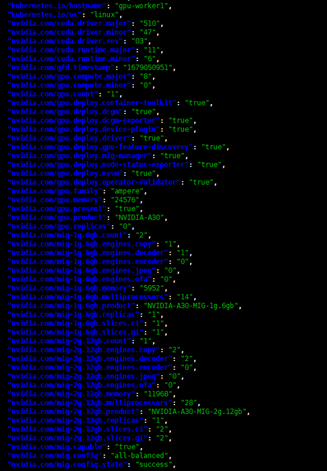
Ví dụ triển khai ứng dụng sử dụng GPU
1. Sharing mode MIG, strategy: single
Tài nguyên GPU được khai báo như sau:
nvidia.com/gpu: <số lượng>

nvidia.com/gpu: 1
Với strategy single, card GPU được chia nhỏ thành các instance bằng nhau.
Ví dụ Deployment sử dụng GPU single strategy:
apiVersion: apps/v1
kind: Deployment
metadata:
  name: example-gpu-app
spec:
  replicas: 1
  selector:
    matchLabels:
      component: gpu-app
  template:
    metadata:
      labels:
        component: gpu-app
    spec:
      containers:
        - name: gpu-container
          securityContext:
            capabilities:
              add:
                - SYS_ADMIN
          resources:
            limits:
              nvidia.com/gpu: 1
          image: nvidia/samples:dcgmproftester-2.0.10-cuda11.0-ubuntu18.04
          command: ["/bin/sh", "-c"]
          args:
            - while true; do /usr/bin/dcgmproftester11 --no-dcgm-validation -t 1004 -d 300; sleep 30; done
2. Sharing mode MIG, strategy: mixed
Tài nguyên GPU được khai báo như sau:
nvidia.com/<mig-profile>: <số lượng>

nvidia.com/mig-1g.6gb: 2
Với strategy mixed, card GPU được chia nhỏ thành nhiều loại instance nên khi khai báo resource cần chỉ rõ loại instance sử dụng.
Ví dụ Deployment sử dụng GPU mixed strategy:
apiVersion: apps/v1
kind: Deployment
metadata:
  name: example-gpu-app
spec:
  replicas: 1
  selector:
    matchLabels:
      component: gpu-app
  template:
    metadata:
      labels:
        component: gpu-app
    spec:
      containers:
        - name: gpu-container
          securityContext:
            capabilities:
              add:
                - SYS_ADMIN
          resources:
            limits:
              nvidia.com/mig-1g.6gb: 1
          image: nvidia/samples:dcgmproftester-2.0.10-cuda11.0-ubuntu18.04
          command: ["/bin/sh", "-c"]
          args:
            - while true; do /usr/bin/dcgmproftester11 --no-dcgm-validation -t 1004 -d 300; sleep 30; done
3. Strategy: none
Tài nguyên GPU được khai báo như sau:
nvidia.com/gpu: 1
Với none strategy, Pod sẽ dùng toàn bộ tài nguyên của một card GPU.
Ví dụ Deployment sử dụng GPU none strategy:
apiVersion: apps/v1
kind: Deployment
metadata:
  name: example-gpu-app
spec:
  replicas: 1
  selector:
    matchLabels:
      component: gpu-app
  template:
    metadata:
      labels:
        component: gpu-app
    spec:
      containers:
        - name: gpu-container
          securityContext:
            capabilities:
              add:
                - SYS_ADMIN
          resources:
            limits:
              nvidia.com/gpu: 1
          image: nvidia/samples:dcgmproftester-2.0.10-cuda11.0-ubuntu18.04
          command: ["/bin/sh", "-c"]
          args:
            - while true; do /usr/bin/dcgmproftester11 --no-dcgm-validation -t 1004 -d 300; sleep 30; done
4. Sharing mode MPS
Tài nguyên GPU được khai báo như sau:
nvidia.com/gpu: <số lượng>

nvidia.com/gpu: 1
Chú ý: số lượng tài nguyên nvidia.com/gpu một Pod request tối đa chỉ bằng 1.