Configure the OpenStack Provider
Initial setup & service authentication
terraform {
required_version = ">= 0.14.0"
  required_providers {
    openstack = {
      source  = "terraform-provider-openstack/openstack"
      version = "~> 1.53.0"
    }
  }
}

provider "openstack" {
  user_name   = "usera"
  tenant_name   = "project_name"
  password    = "pwd"
  auth_url    = <fptcloud identity endpoint>
  region      = "RegionOne"
}

resource "openstack_compute_instance_v2" "test-server" {
  # ...
}
| Parameters | Description | Environment Variable |
|---|---|---|
auth_url | URL of Identity Service | OS_AUTH_URL |
region | Region of FPT cloud | OS_REGION_NAME |
user_name | Username provided by FPT Cloud | OS_USERNAME |
user_id | OS_USER_ID | |
user_domain_name | OS_USER_DOMAIN_NAME | |
user_domain_id | OS_USER_DOMAIN_ID | |
tenant_id | OS_PROJECT_ID | |
tenant_name | VPC name provided by FPTCloud | OS_PROJECT_NAME |
project_domain_name | OS_PROJECT_DOMAIN_NAME | |
project_domain_id | OS_PROJECT_DOMAIN_ID | |
domain_name | OS_DOMAIN_NAME | |
domain_id | OS_DOMAIN_ID | |
insecure | OS_INSECURE | |
interface | OS_INTERFACE | |
| ... |
- Other optional configurations can be found at Configuration Reference
Core components
A. Networking
1. Router
   resource "openstack_networking_router_v2" "router_1" {
        name                = "my_router"
        admin_state_up      = true
        external_network_id = "f67f0d72-0ddf-11e4-9d95-e1f29f417e2f"
    }
| Parameters | Description | Required |
|---|---|---|
region | Region of vRouter | |
name | Name of vRouter | |
external_network_id | ID of external gateway, a router with an external gateway is required if any compute instances or load balancers will be using floating IPs. | |
| ... |
2. Network
    resource "openstack_networking_network_v2" "network_1" {
      name           = "network_1"
      admin_state_up = "true"
    }

    resource "openstack_networking_subnet_v2" "subnet_1" {
      name       = "subnet_1"
      network_id = openstack_networking_network_v2.network_1.id
      cidr       = "192.168.199.0/24"
      ip_version = 4
    }

    resource "openstack_compute_secgroup_v2" "secgroup_1" {
      name        = "secgroup_1"
      description = "a security group"

      rule {
        from_port   = 22
        to_port     = 22
        ip_protocol = "tcp"
        cidr        = "0.0.0.0/0"
      }
    }

    resource "openstack_networking_port_v2" "port_1" {
      name               = "port_1"
      network_id         = openstack_networking_network_v2.network_1.id
      admin_state_up     = "true"
      security_group_ids = [openstack_compute_secgroup_v2.secgroup_1.id]

      fixed_ip {
        subnet_id  = openstack_networking_subnet_v2.subnet_1.id
        ip_address = "192.168.199.10"
      }
    }

    resource "openstack_compute_instance_v2" "instance_1" {
      name            = "instance_1"
      security_groups = [openstack_compute_secgroup_v2.secgroup_1.name]

      network {
        port = openstack_networking_port_v2.port_1.id
      }
    }
| Parameters | Description | Type | Default | Required |
|---|---|---|---|---|
name | Name of network. | string | Yes | |
shared | Specifies whether the network resource can be accessed by any tenant or not. | bool | false | No |
| ... |
3. Subnet
   resource "openstack_networking_network_v2" "network_1" {
      name           = "tf_test_network"
      admin_state_up = "true"
    }

    resource "openstack_networking_subnet_v2" "subnet_1" {
      network_id = openstack_networking_network_v2.network_1.id
      cidr       = "192.168.199.0/24"
    }
| Parameters | Description | Type | Default | Required |
|---|---|---|---|---|
network_id | ID of network from previous step. | string | Yes | |
cidr | CIDR representing IP range for this subnet, based on IP version. | string | Yes | |
ip_version | IP version of subnet. | int | 4 | No |
enable_dhcp | Enable DHCP for subnet. | bool | true | No |
allocation_pools | IP pools of DHCP . | list | No | |
gateway_ip | Default IP Gateway. | string | No | |
host_routes | List of default static host routes. | list | No | |
dns_nameservers | List of DNS server of subnet. | list | No | |
prefixlen | Prefix length of subnet. | int | No | |
| ... |
4. Port
    resource "openstack_networking_network_v2" "network_1" {
      name           = "network_1"
      admin_state_up = "true"
    }

    resource "openstack_networking_port_v2" "port_1" {
      name           = "port_1"
      network_id     = openstack_networking_network_v2.network_1.id
      admin_state_up = "true"
    }
| Parameters | Description | Type | Default | Required |
|---|---|---|---|---|
network_id | ID of network from previous step. | string | Yes | |
mac_address | Fix MAC address for port. | string | No | |
name | Port name. | string | No | |
fixed_ips | Fixed IP for port. | list | No | |
allowed_address_pairs | An IP/MAC Address pair of additional IP addresses that can be active on this port. | list | No | |
security_group_ids | A list of security group IDs to apply to the port. | list | No | |
| ... |
5. FloatingIP
    resource "openstack_networking_floatingip_v2" "floatip_1" {
      pool = "provider-net4"
    }
| Parameters | Description | Type | Default | Required |
|---|---|---|---|---|
pool | The name of the pool from which to obtain the floating IP. Changing this creates a new floating IP. E.g. provider-net4 | string | Yes | |
port_id | ID of an existing port with at least one IP address to associate with this floating IP. | string | No | |
fixed_ip | Fixed IP of the port to associate with this floating IP. | string | No | |
description | Human-readable description for the floating IP. | string | No | |
| ... |
6. Security Group
    resource "openstack_networking_secgroup_v2" "secgroup_1" {
      name        = "secgroup_1"
      description = "My neutron security group"
    }
| Parameters | Description | Type | Default | Required |
|---|---|---|---|---|
name | A unique name for the security group. | string | Yes | |
description | Human-readable description for the security group. | string | No | |
tenant_id | The owner of the security group. Required if admin wants to create a port for another tenant. | string | No | |
| ... |
7. Security Group Rule
    resource "openstack_networking_secgroup_v2" "secgroup_1" {
      name        = "secgroup_1"
      description = "My neutron security group"
    }

    resource "openstack_networking_secgroup_rule_v2" "secgroup_rule_1" {
      direction         = "ingress"
      ethertype         = "IPv4"
      protocol          = "tcp"
      port_range_min    = 22
      port_range_max    = 22
      remote_ip_prefix  = "0.0.0.0/0"
      security_group_id = openstack_networking_secgroup_v2.secgroup_1.id
    }
| Parameters | Description | Type | Default | Required |
|---|---|---|---|---|
security_group_id | The security group id the rule should belong to, the value needs to be an Openstack ID of a security group in the same tenant. | string | Yes | |
direction | ingress or egress. | string | Yes | |
ethertype | Layer 3 protocol type (** IPv4** , IPv6). | string | Yes | |
protocol | Layer 4 protocol type (tcp, udp, icmp, ...). | string | Yes | |
remote_ip_prefix | remote CIDR | string | No | |
remote_group_id | The remote group id, the value needs to be an Openstack ID of a security group in the same tenant. | string | No | |
port_range_min | int | No | ||
port_range_max | int | No | ||
description | A description of the rule. | string | No | |
| ... |
B. Storage
1. Volume
    resource "openstack_blockstorage_volume_v3" "volume_1" {
      region      = "RegionOne"
      name        = "volume_1"
      description = "first test volume"
      volume_type = "PremiumSSD-2000_floor5"
      availability_zone = "floor5"
      size        = 40
    }
| Parameters | Description | Type | Default | Required |
|---|---|---|---|---|
size | The size of the volume to create (in gigabytes). | int | Yes | |
name | A unique name for the volume. | string | No | |
description | A description of the volume. | string | No | |
availability_zone | The availability zone for the volume. | string | No | |
image_id | The image ID from which to create the volume. | string | No | |
volume_type | The type of volume to create. | string | No | |
| ... |
C. Compute
1. Instance
resource "openstack_blockstorage_volume_v3" "myvol" {
  name = "myvol"
  size = 40
  volume_type = "PremiumSSD-2000_floor5"
  availability_zone = "floor5"
}

resource "openstack_compute_instance_v2" "myinstance" {
  name            = "myinstance"
  image_name        = "UBUNTU-20.04-10072023"
  flavor_name       = "Small.2"
  key_pair        = "my_key_pair_name"
  security_groups = ["default"]
  availability_zone = "floor5"

  network {
    name = "my_network"
  }
}

resource "openstack_compute_volume_attach_v2" "attached" {
  instance_id = openstack_compute_instance_v2.myinstance.id
  volume_id   = openstack_blockstorage_volume_v3.myvol.id
}
| Parameters | Description | Type | Default | Required | |
|---|---|---|---|---|---|
| name | A unique name for the resource. | string | Yes | ||
| flavor_name | The name of the desired flavor for the server. | string | Yes | ||
| image_name | The name of the desired image for the server. | string | Yes | ||
| key_pair | The name of a key pair to put on the server. | string | No | ||
| user_data | cloud-init script, the user data to provide when launching the instance. | string | No | ||
| metadata | map | No | |||
| security_groups | An array of one or more security group names to associate with the server. | list | No | ||
| network | An array of one or more networks to attach to the instance. | string | No | ||
| block_device | Configuration of block devices. | list | No | ||
| availability_zone | The availability zone in which to create the server. | string | No | ||
| ... |
Example
This section focus on show up the actual use case of FPT Cloud Iac by using terraform to deploy new Web Application on FPT Cloud, the step described as the following:
- Setting up terraform
- Create new project directory include
main.tffile with the following content:
terraform {
required_version = ">= 0.14.0"
  required_providers {
    openstack = {
      source  = "terraform-provider-openstack/openstack"
      version = "~> 1.53.0"
    }
  }
}

provider "openstack" {
  user_name   = <user-name>
  tenant_id = <project-uuid>
  user_domain_name = <domain-name>
  password    = <password>
  auth_url    = <fptcloud identity endpoint>
  region      = "RegionOne"
}

data "openstack_networking_network_v2" "provider_net" {
  name = "provider-net5"
}

resource "openstack_networking_router_v2" "webapp_router" {
  name                = "webapp_router"
  admin_state_up      = true
  external_network_id = data.openstack_networking_network_v2.provider_net.id
}

resource "openstack_networking_network_v2" "webapp_network" {
  name           = "webapp_network"
  admin_state_up = true
}

resource "openstack_networking_subnet_v2" "webapp_subnet" {
  name            = "webapp_subnet"
  network_id      = openstack_networking_network_v2.webapp_network.id
  cidr            = "10.0.0.0/24"
  ip_version      = 4
  dns_nameservers = ["1.1.1.1"]
}

resource "openstack_networking_router_interface_v2" "webapp_router_interface" {
  router_id = openstack_networking_router_v2.webapp_router.id
  subnet_id = openstack_networking_subnet_v2.webapp_subnet.id
}

resource "openstack_compute_secgroup_v2" "webapp_secgroup" {
  name        = "webapp_secgroup"
  description = "Allow web traffic"
  rule {
    from_port   = 80
    to_port     = 80
    ip_protocol = "tcp"
    cidr        = "0.0.0.0/0"
  }
  rule {
    from_port   = 22
    to_port     = 22
    ip_protocol = "tcp"
    cidr        = "0.0.0.0/0"
  }
}

resource "openstack_compute_floatingip_v2" "webapp_floatingip" {
  pool = "provider-net5"
}

data "openstack_images_image_v2" "ubuntu_image" {
  name = "UBUNTU-22.04-10072023"
}

resource "openstack_blockstorage_volume_v3" "webapp_volume" {
  name        = "webapp_volume"
  description = "Volume for webapp"
  size        = 40
  volume_type        = "Premium-SSD_floor5"
  image_id    = data.openstack_images_image_v2.ubuntu_image.id
}

data "openstack_compute_keypair_v2" "webapp_key" {
  name = "webapp_key"
}

data "openstack_compute_flavor_v2" "s2_medium_1" {
  name = "2C2G"
}

/* Userdata
#cloud-config
package_update: true
chpasswd:
  list: |    root:<password-vm>
  packages:
  - nginx  - gitruncmd:
  - systemctl enable nginx
  - systemctl start nginx
  - git clone https://github.com/cloudacademy/static-website-example.git
  - cp -r ./static-website-example/* /var/www/html/
  - rm -r ./static-website-example*/

resource "openstack_compute_instance_v2" "webapp_instance" {
  name            = "webapp_instance"
  image_id        = data.openstack_images_image_v2.ubuntu_image.id
  flavor_id       = data.openstack_compute_flavor_v2.s2_medium_1.id
  key_pair        = data.openstack_compute_keypair_v2.webapp_key.name
  security_groups = [openstack_compute_secgroup_v2.webapp_secgroup.name]
  availability_zone = "floor5"

  user_data = "#cloud-config\npackage_update: true\nchpasswd:\n  list: |\n    root:Welcome***123\npackages:\n  - nginx\n  - git\nruncmd:\n  - systemctl enable nginx\n  - systemctl start nginx\n  - git clone https://github.com/cloudacademy/static-website-example.git\n  - cp -r ./static-website-example/* /var/www/html/\n  - rm -r ./static-website-example"
  network {
    name = openstack_networking_network_v2.webapp_network.name
  }
  block_device {
    uuid                  = openstack_blockstorage_volume_v3.webapp_volume.id
    source_type           = "volume"
    destination_type      = "volume"
    boot_index            = 0
    delete_on_termination = true
  }
}

resource "openstack_compute_floatingip_associate_v2" "webapp_floatingip_associate" {
  floating_ip = openstack_compute_floatingip_v2.webapp_floatingip.address
  instance_id = openstack_compute_instance_v2.webapp_instance.id
}

output "webapp_public_ip" {
  value       = openstack_compute_floatingip_v2.webapp_floatingip.address
  description = "Web Application URL"
}

output "webapp_private_ip" {
  value       = openstack_compute_instance_v2.webapp_instance.access_ip_v4
  description = "Web Application Private IP"
}
- Deploying application
terraform init
terraform apply --auto-approve
-
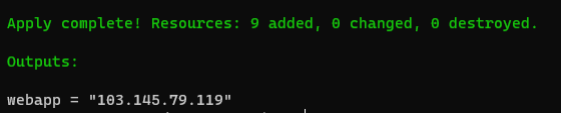
The result of terraform CLI:
-
Acces the floating IP and enjoy the result of
webapp
-
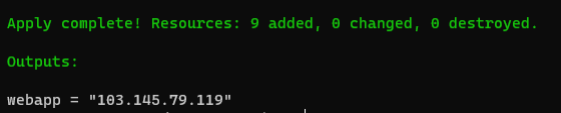
Cleaning-up the whole resources created by IaC stack:

terraform destroy --auto-approve