ASPM v1.3.0
With the shift toward DevSecOps automation that improves operational efficiency and continuous security control, scan schedule management plays a key role in keeping systems monitored regularly and accurately. FPT Smart Cloud introduces a new upgrade to the FSP (FPT Security Platform) AppSec Service with the Schedule Management feature, letting users easily create, track, and manage security scan schedules.
1. Description
The Schedule Management feature lets users create, manage, and monitor security scan schedules in a flexible and efficient way. By configuring scan frequency, scope, and scan type, users can automate security checks, reduce manual operations, and ensure continuous DevSecOps execution.
2. Features
-
Create schedule: lets users create a new schedule with the following key fields:
-
Name and Description for identification.
-
Frequency: supports three modes — On-demand, Weekly, Monthly.
-
Scope Configuration: select team, asset type, repository source (GitHub, GitLab, GitLab Server), applicable branch (main/master), and Last Scan condition.
-
Action: select scan type to run (Code Analysis, Secret Scan, IaC Scan).
-
-
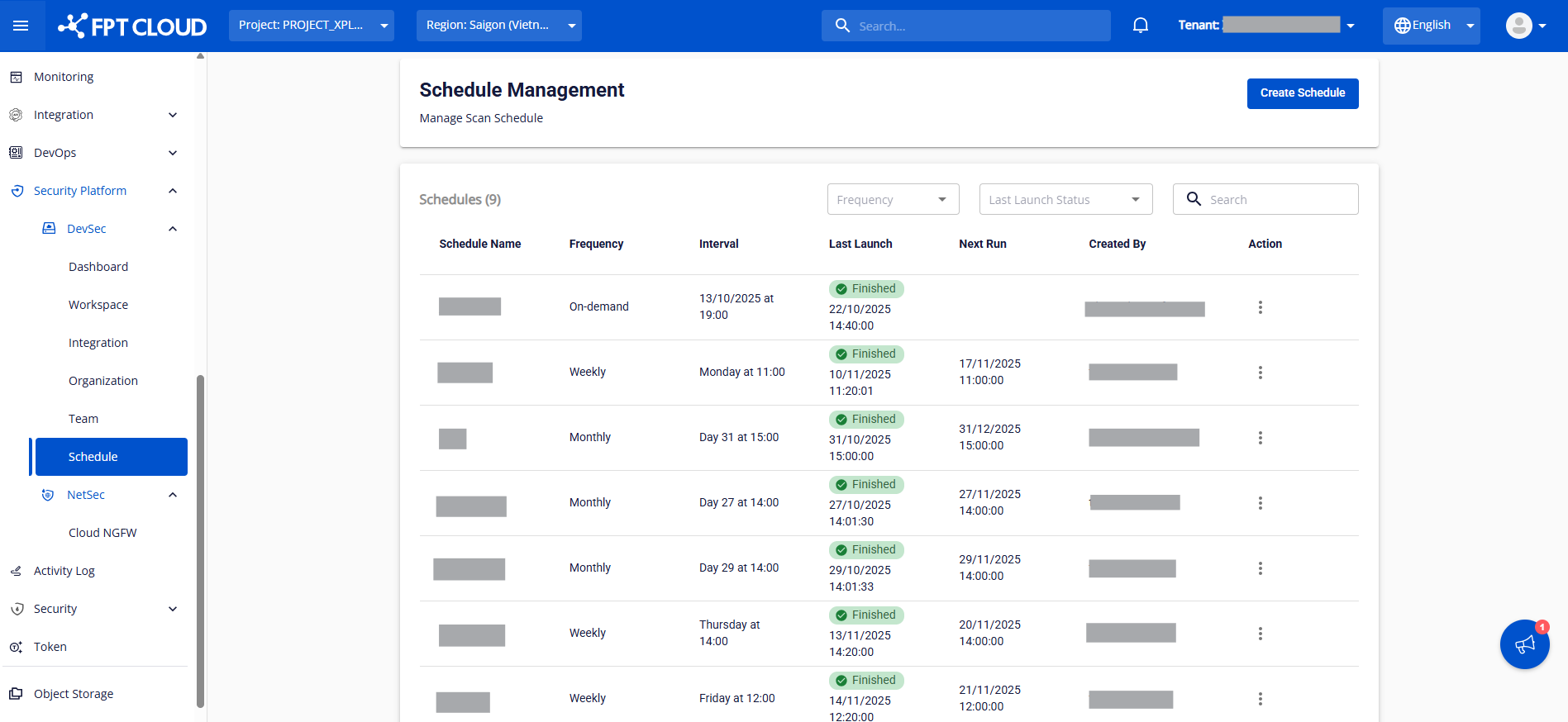
Schedule list & detail view
-
Displays all schedules sorted by the most recent creation date.
-
Shows: Schedule ID, Name, Frequency, Interval, Last Launch, Next Run, Created By, and Action (Edit/Delete).
-
Click a schedule name to view its detailed configuration.
-
-
Edit schedule
-
Lets users edit schedule information directly from the list or in the detail screen.
-
Users can update the run frequency, scope, scan type, or schedule description.
-
-
Delete schedule
-
Remove schedules that are no longer needed in a single action.
-
A confirmation prompt prevents accidental deletion.
-
3. Capacity
-
Supports creating and managing multiple schedules in parallel, applied per team or per scan scope.
-
Allows flexible scope customization by repository source, last scan time, and scan type — suitable for any organization size or need.
-
Ensures data integrity across schedule edits and deletions.
4. Performance
-
The automated scan engine runs reliably on the configured schedule, reducing the risk of missing periodic scans.
-
The Last Launch and Next Run fields are continuously updated, so users always know the exact execution status of each schedule.